 GoLocomotive
Work orders and workshop
Every job, from the booking to the invoice
A breakdown, a service, a repair: the order carries its lines and who pays them, reserves its parts, asks the customer’s approval by a link, counts the technicians’ time, and is invoiced to each payer.
What the module does
Four parts that hold together: the order and its lines, the parts, the customer’s approval, the time spent.
The order and its lines
The customer, their good (a vehicle, a boiler), their request, then the lines: labour, parts, packages, sublet work, fees. Each line says who pays: the customer, the warranty, the insurer or the house.
The parts
A part is reserved in stock from the moment the good is received and consumed when the work is done. Each line says whether its part is there, ordered or missing.
The customer’s approval
Extra work is asked by a link the customer opens on their phone: they see the lines and the total, accept or refuse, and their answer is kept with its proof.
The time spent
Technicians clock on the order they work on; the hours sold read against the hours clocked, and the day’s presence is checked each morning.
Not there yet
- The printed order with a QR code that opens it on a phone.
- Returning to stock a part already consumed when a finished order is reopened.
Screen by screen
The screens come from the example app of a leisure vehicle dealer and that of a heating firm, on made up data. In your app, they carry your words, your job types and your payers.
Workshop manager, service advisors, agency assistants
The whole workshop at a glance
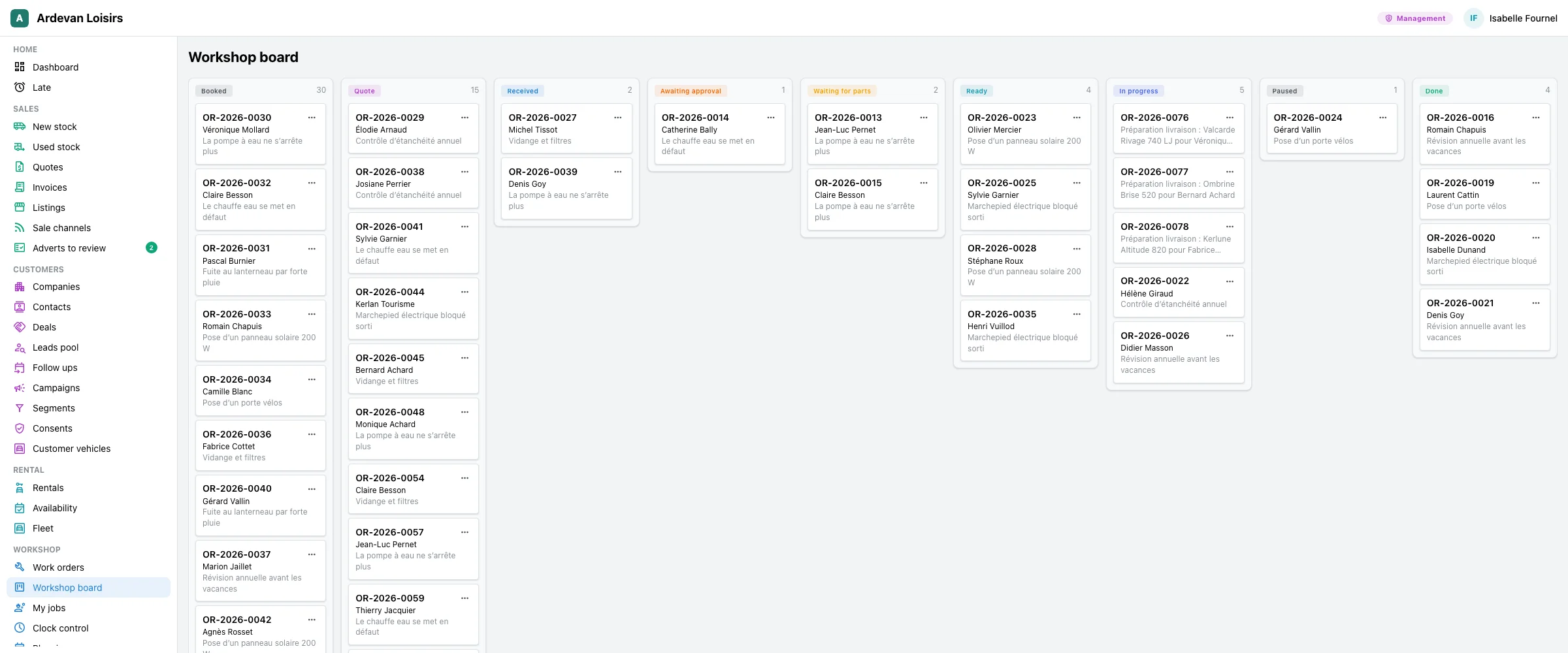
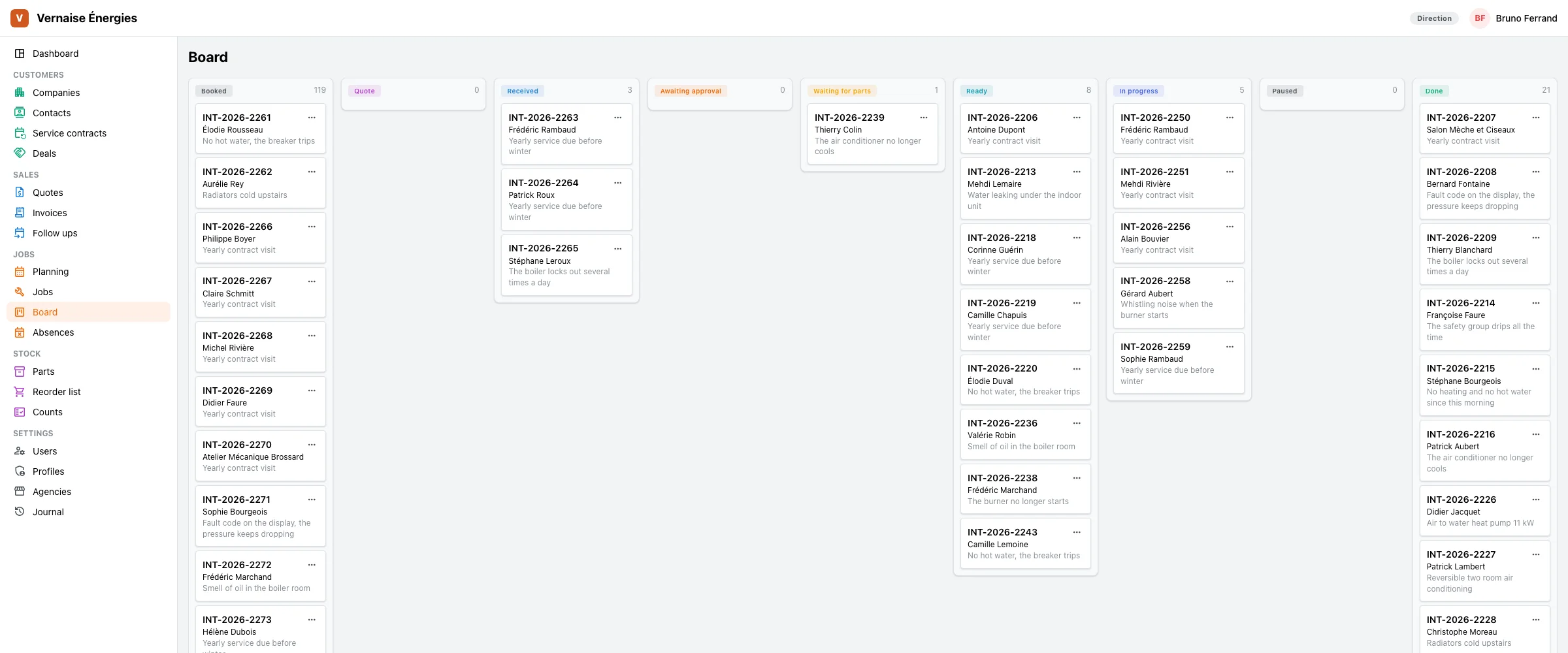
Where each order stands, from the booking to the end of the work, and what waits for a part or an approval.
- The board by status: booked, quote, received, awaiting approval, waiting for parts, ready, in progress, paused, done; each card changes status from its menu.
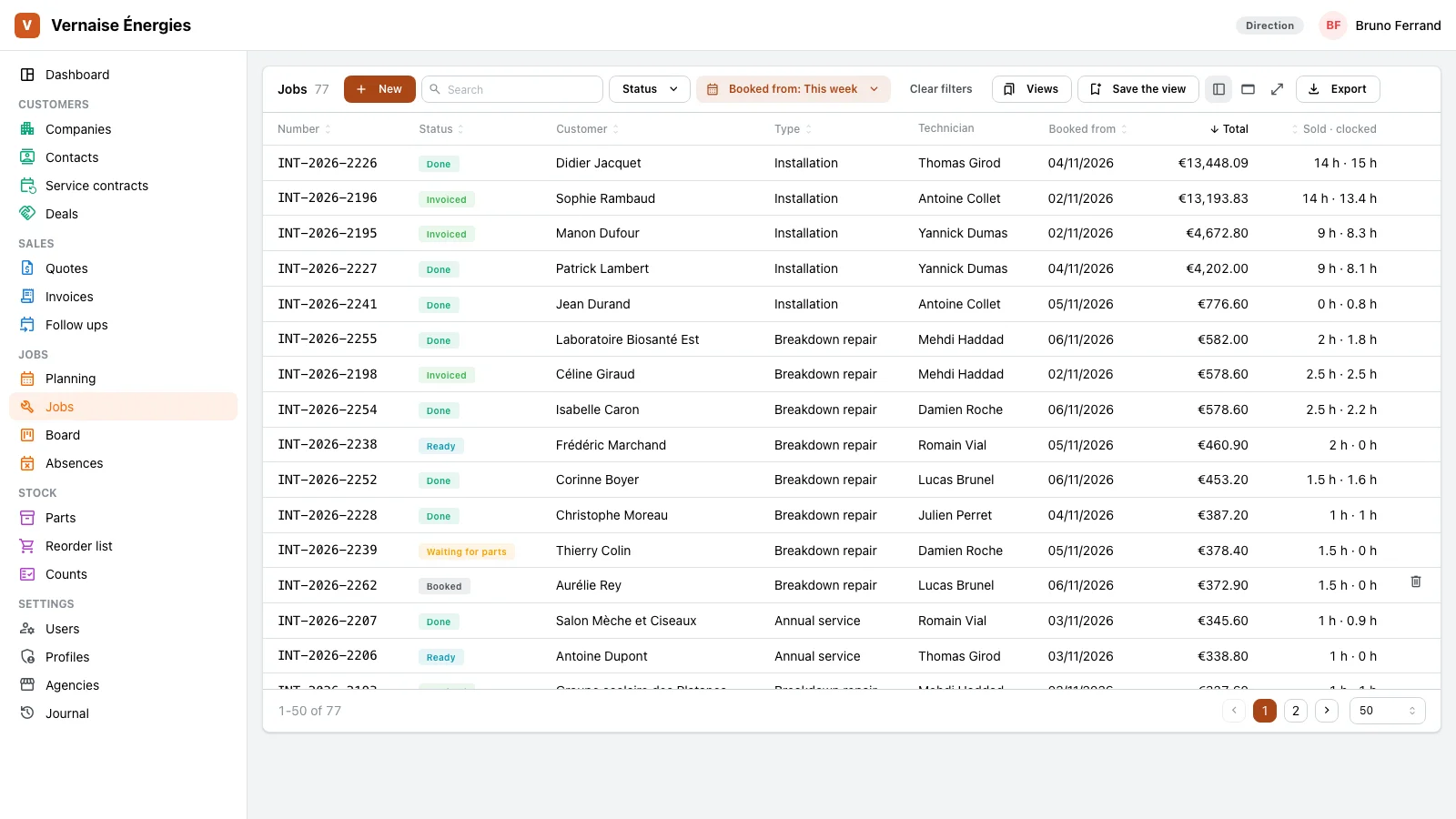
- The list with each job’s type in your words, the technician, the total, and the hours sold against the hours clocked.
- Filters by status, type and period, saved views and spreadsheet export.
Service advisors, workshop manager
A repair order, end to end
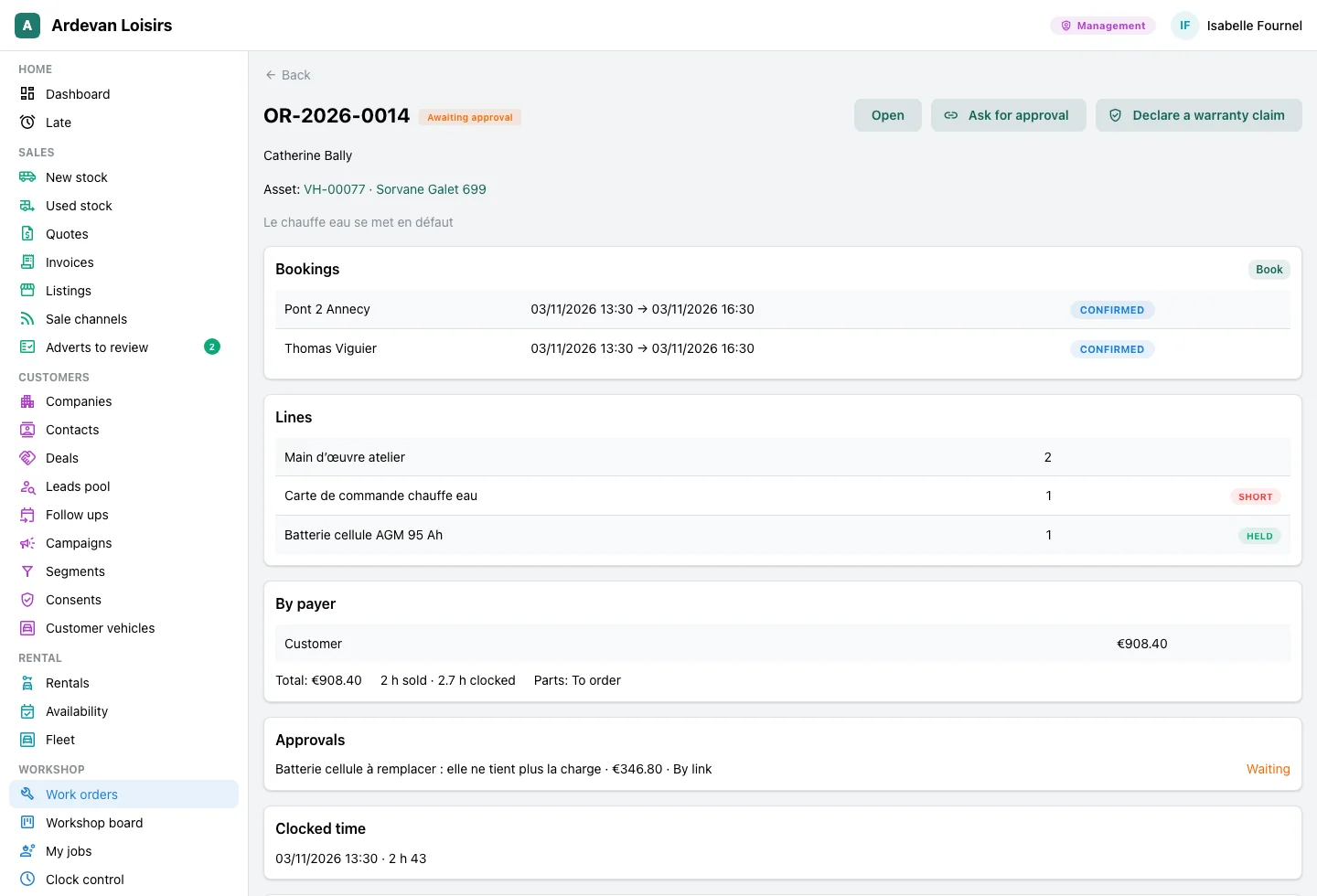
Everything about the work on one page, up to each payer’s invoice.
- The lines and their payer, the total per payer; a warranty line goes to the warranty claim, the insurer’s onto its invoice.
- Each part says its state: held, short, ordered, issued. It is reserved when the good is received and consumed when the work is done.
- “Ask for approval” sends the customer a link; their answer comes back with its proof, and while it waits the order cannot close.
- The booking on the planning, a bay and a technician, and the time clocked on the order.
Technicians
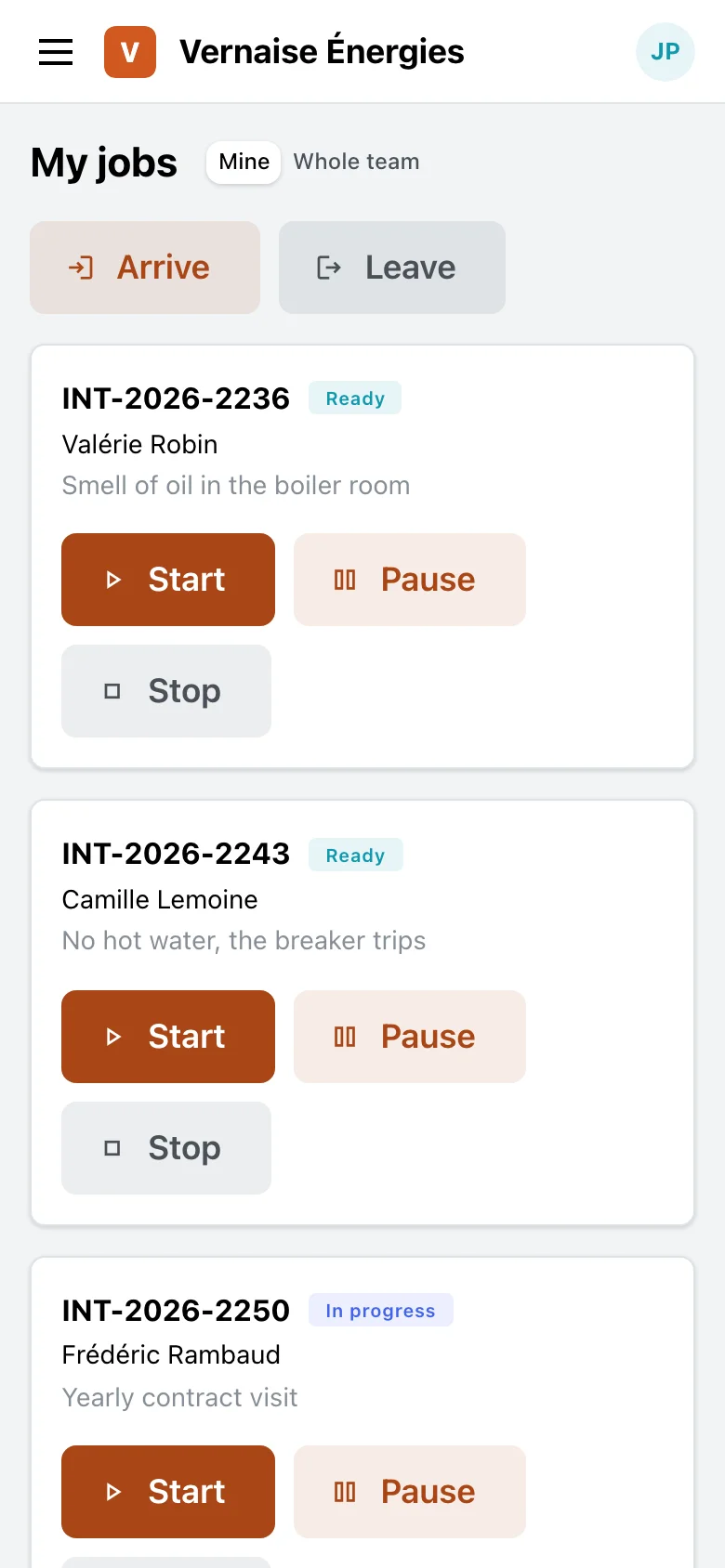
His day, on his phone
His jobs of the day, and clocking in one gesture.
- The working orders he is the technician of, or the whole workshop with one button.
- Arrive, start, pause, stop, leave: one gesture each.
- In the morning, each one’s presence is checked in figures: present, on orders, paused, what is missing.
The trades that use it
The same module, with the words, the goods and the payers of each trade.
Leisure vehicle dealers
The workshop and its repair orders, the warranty and the insurer as payers, the leak test on the order, the preparation of sold vehicles. The dealers’ page tells the workshop.
At the workshop →Heating and plumbing firms
Breakdowns, annual services and installations, the technician who clocks and follows his day on his phone.
The technician →Your trade
A bike repairer, a boat yard, an appliance repairer: the same screens, with your goods and your words.
Let’s talk →
With the other modules
The order reads and writes what the other modules hold, with nothing typed twice.
Planning
Book a technician or a bay for the order, and the order follows the planning both ways.
See the module →Stock and parts
Parts reserved, consumed or released to stock, as the order’s status says.
See the module →Quotes and invoices
A finished order is invoiced to each payer, its lines taken along.
See the module →Warranty claims
The warranty lines go to the maker’s warranty claim.
See the module →
Your workshop, your jobs
GoLocomotive is in private testing. Access is by invitation. Once you are invited, we show you this module on your trade, with your own job types.